Separate domain for cold email: 6 questions answered
When a second domain protects the mail your customers rely on, what it should look like, and what it will not fix.
November 25, 2026, 6 min read

Yes, most founders should send cold email from a separate domain. Cold mail draws more spam reports than mail people expect, and those reports count against the domain that sent it. If that domain is also the one your invoices, password resets and support replies come from, a bad week of outreach can push customer mail into spam.
Below are the six questions founders ask before they buy that second domain, with the rules of Gmail, Yahoo and Outlook behind each answer.
1. Do you need a separate domain for cold email?
You need one as soon as cold email is more than a handful of messages a week. The reason is the complaint line. Google tells every sender to keep spam rates reported in Postmaster Tools below 0.3%, and Yahoo sets the same 0.3% ceiling for spam complaints. Mail to strangers crosses that line far more easily than mail to customers.
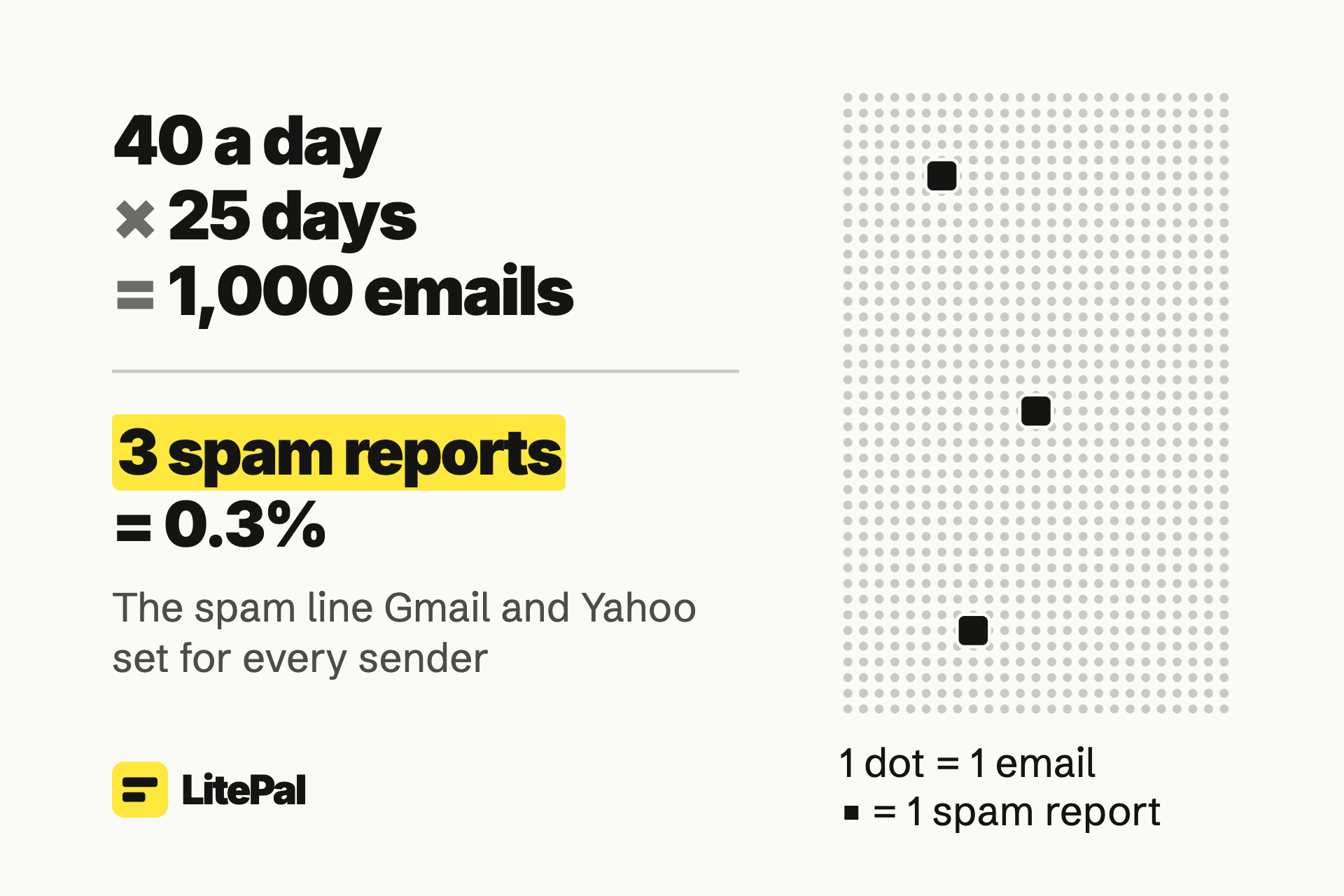
Here is the arithmetic for a hypothetical scheduling tool for dentists. The founder sends 40 cold emails a day for 25 working days: 40 × 25 = 1,000 emails. At 0.3%, the line is 1,000 × 0.003 = 3 spam reports. Three annoyed dentists in a month are enough. If those 1,000 emails left from the same domain as the product's login emails, every customer now shares the damage.
Yahoo says this directly in its guidance: each IP and DKIM domain has a reputation, and it tells senders to keep bulk and marketing mail apart from user and transactional mail. A separate domain is the simplest way for a small team to follow that advice.
2. Is a subdomain enough?
A subdomain helps less than founders hope. Google counts the volume of a subdomain together with its parent. In its own example, 2,500 messages from a domain and 2,500 from its promotions subdomain add up to 5,000 messages from one primary domain, and that sender becomes a bulk sender. Google also says that a sender who meets the bulk criteria once is a bulk sender permanently.
Some deliverability writers prefer a subdomain because the recipient still sees your brand. Suped, for example, recommends a brand subdomain as the default for bulk mail and notes that the subdomain still needs its own sending history. That advice fits newsletters to people who signed up. Cold email to people who did not sign up carries more risk, so a separate domain is the safer choice while you still test lists and copy.
3. What should the new domain look like?
Pick a name that a prospect connects to your product at a glance. lemlist suggests brand-adjacent variants such as acmehq.com or tryacme.com and warns against random names that make a reader ask who you are. Hunter adds three checks:
- Choose a reputable top-level domain, preferably .com, and avoid endings that spammers use a lot.
- Check the name on public blocklists before you buy it, because a used domain can carry an old reputation.
- Send visitors from the new domain to your main site with a 301 redirect, because many recipients type the domain to see who wrote.
Those three come from Hunter's guide to a dedicated cold email domain. Keep the sender name, the signature and the website link the same as on your main domain, so the person sees one company, not two.
4. Which records does the new domain need?
It needs the same authentication as your main domain: SPF, DKIM and DMARC. Gmail asks every sender for SPF or DKIM, valid forward and reverse DNS, and a TLS connection, and asks bulk senders for all three records plus DMARC. Yahoo asks bulk senders for a DMARC policy of at least p=none that passes.
Outlook joined them in 2025. For domains that send over 5,000 emails a day, Outlook requires SPF, DKIM and DMARC to pass and it routes mail that fails to the Junk folder. A founder sending 40 emails a day is far below that volume, but all three records on day one remove one reason for spam folders. Our guide to keeping cold emails out of spam walks through each record.
5. How many emails can the new domain send?
Fewer than the mailbox allows. A Google Workspace account has a daily sending limit of 2,000 messages per user, and 500 on a trial account. That limit is a ceiling for the software, not a target for a new domain with no history.
Google warns that a sender without a history of large volumes who suddenly doubles previously sent volumes can be rate limited or lose reputation. So start a new domain with a few personal messages a day, add volume in small steps, and watch replies and bounces. If you want a number to plan with, our post on how many cold emails to send per day works through it.
6. What will a separate domain not fix?
A separate domain contains the damage. It does not stop it. The same 0.3% line applies to the new domain, and Yahoo still asks you to honour unsubscribes within 2 days. If the list is wrong, the new domain burns too, and you will be buying a third one in a month.
The fixes that keep any domain healthy are about who you write to. Write to people whose company fits your product, use checked addresses so you do not bounce, and send a short note that a busy person can answer. A high cold email bounce rate is usually a list problem, not a domain problem. LitePal helps with that part: it finds companies that fit your product, the decision-maker to write to with a checked email, and a drafted first line. You send from your own mailbox on the domain you set up.
Before your next cold email goes out, check that it leaves from a brand-adjacent domain with SPF, DKIM and DMARC, that the domain redirects to your site, and that the people on the list have a reason to care. Paste your site into LitePal to see which companies fit your product, and who at each one to write to first.

